

Pubcookie at ISU
The Concept of Pubcookie
Pubcookie provides single sign-on authentication to web sites using existing site-wide authentication services. In this way, a user who has already authenticated for access to one web site can access other protected sites without having to enter another password. For example, a user who has authenticated to a webmail system could browse a separate web database system without needing to login again.
Pubcookie provides the glue between the authentication service and the web site and is not responsible for the actual authentication or authorization of users. Pubcookie does not verify who the user is - it hands this task off to a separate authentication service (like Kerberos). Likewise, Pubcookie does not decide if a user should be allowed to access a given page or resource. Control of access to the resource is left to the originating application (usually by way of the .htaccess file).
This is accomplished, as the name implies, with cookies. When a user initially attempts to access a protected site (Arrow #1), the Pubcookie module at that site automatically redirects her browser to a Pubcookie login page with a granting request cookie containing the request (the URL) and a random number (#2). The user enters her user name and password on the login page (#3), which Pubcookie verifies using the configured authentication service (#4 and #5). Pubcookie then returns two cookies to the user’s browser (#6) and redirects the user back to the original site (#7).
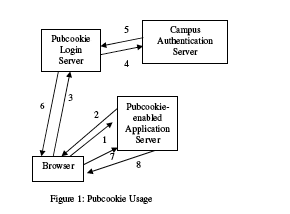
The first of these cookies returned in step #6 is a granting cookie. This cookie authenticates the user to the target web site (“Pubcookie-enabled Application Server”). The cookie contains the information in the original granting request cookie plus the authenticated username. When the Pubcookie login server redirects the browser back to the original web site (#7), the Pubcookie module at the web site verifies the web page. If the user is authorized, the web server returns the requested content (i.e., the web page) with a session cookie for that site to authenticate subsequent requests at that site (#8).
The second cookie returned by the login server is the Pubcookie session cookie. As its name implies, this is the cookie that the user maintains throughout their Pubcookie session. When the user visits a new Pubcookie-enabled web site, it will again redirect her to the Pubcookie login server. However, now that the user has a Pubcookie session cookie, she does not have to login again (Steps #4 and #5). The login server verifies the session cookie and automatically redirects the user back to the new web site with a new granting cookie. Thus, the user has a single sign-on to all Pubcookie-enabled web sites.
There are two means by which the security of these cookies is guaranteed. First, they are encrypted. When Pubcookie is being setup, the Pubcookie login server (which issues the cookies) and the application server (i.e., the web server the user is trying to access) exchange a cryptographic key (see [1] below). This key is in turn used to encrypt and decrypt the data used by Pubcookie. The second method by which security is achieved is digital signatures. The Pubcookie login server digitally signs all cookies it issues, so that application servers can use the login server’s public key (see [2] below) to verify the authenticity of the cookies it issues.
The following steps explain the process for setting up a site to utilize Pubcookie at ISU.
Step 1
Before you build and install the module, confirm that your SSL configuration is working and that your web server responds to HTTPS requests. The Pubcookie module requires a functioning SSL-enabled server.
Step 2
Read http://pubcookie.org/docs/install-mod_pubcookie.html thoroughly.
Instructions included on that page:
- Overview
- What’s New
- Upgrading
- Prerequisites
- System Requirements
- Confirm SSL Support
- Build & Install
- Run Keyclient
- Configuration (httpd.conf)
- Start Apache
- Test Pubcookie Authentication
- Logout Configuration
- Cross-Domain Relay Configuration
- Virtual Host Configuration
- Clustered Host Configuration
- Troubleshooting
- Appendix A: How to Enable SSL
- Appendix B: Configuration For Abbreviated Domain Names
Step 3
Here are pertinent notes pertaining to the Prerequisites section of the forementioned document:
 The module relies on additional infrastructure at your site. Here are

 some general prerequisites that, if fulfilled, will lead to a smooth,

 successful installation:
* Determine the location of your site’s Pubcookie login server.
You’ll need this URL to configure the module. You may also want to find
out its version, so that you know what features it supports.
https://weblogin.iastate.edu/
version 3.1.1
[1]
 * Determine the location of your site’s Pubcookie keyserver. You’ll

 need this URL to request a symmetric encryption key that your server

 will share with your login server. Depending on the keyserver version

 and site policy, you may also need to ask your administrator to

 “permit” your server to request keys.
(Go back to the conceptual explanation above)
https://weblogin.iastate.edu:2222
Send an e-mail
to weblogin-request@iastate.edu to “permit” your server (via “keyclient”) to request keys. Be sure to include:
- place “keyserver request” in the “Subject:” line
- the SSL server’s IP number (i.e. the SSL server you will run keyclient and pubcookie on)
- the SSL server’s site name (i.e. the SSL server name you got a certificate for)
- the technical contact’s name
- the technical contact’s e-mail
You will receive an e-mail back confirming you have been “permited” to issue keyclient commands against our local keyserver.
 * Determine how trust is handled by your site’s Pubcookie keyserver.

 You’ll need to know which Certificate Authorities the keyserver trusts

 to verify certificates. Similarly, you’ll need to know which Certificate

 Authority can verify the keyserver’s certificate. Ask your

 administrator for guidelines; it’ll save you time and effort.
The CAs bundled in the standard distribution file: /usr/share/ssl/certs/ca-bundle.crt.
Self-signed certificate authorities are not allowed.
[2]
 * Determine how your site distributes its Pubcookie “granting”

 certificate. You’ll need a copy of this certificate (file) to verify

 the “granting” cookies signed and sent by your site’s login server. You

 may be able to download it from your keyserver, or you may have to

 obtain it manually. Ask your administrator which method to use.
(Go back to the conceptual explanation above)
Download it from the keyserver once your IP number has been “permited” as described above.
Example /usr/local/pubcookie/config (config docs):
# 1 is a good starting point
logging_level: 1

# ssl config
ssl_key_file: /etc/httpd/conf/ssl.key/server.key
ssl_cert_file: /etc/httpd/conf/ssl.crt/server.crt

# keyclient-specific config
keymgt_uri: https://weblogin.iastate.edu:2222
ssl_ca_file: /usr/share/ssl/certs/ca-bundle.crt

keydir: /usr/local/pubcookie/keys
Example /var/www/html/.htaccess:
PubcookieAppID protected
AuthType NetID
require valid-user
Example /etc/httpd/conf.d/pubcookie.conf ( mod_pubcookie-directives):
LoadModule pubcookie_module modules/mod_pubcookie.so
#
# Pubcookie configuration section
#
PubcookieGrantingCertFile /usr/local/pubcookie/keys/pubcookie_granting.cert
PubcookieSessionKeyFile /etc/httpd/conf/ssl.key/server.key
PubcookieSessionCertFile /etc/httpd/conf/ssl.crt/server.crt
PubcookieLogin https://weblogin.iastate.edu/
PubcookieDomain .iastate.edu
PubcookieKeyDir /usr/local/pubcookie/keys/
PubcookieAuthTypeNames NetID
# Disable inactivity timeout by default
<Directory "/var/www/html">
PubcookieInactiveExpire -1
</Directory>
<Directory "/var/www/cgi-bin">
PubcookieInactiveExpire -1
PubcookieHardExpire 3600
</Directory>
<LocationMatch .*/LOGOUT-REDIRECT>
AuthType NetID
require valid-user
PubcookieEndSession redirect
</LocationMatch>
<LocationMatch .*/LOGOUT-CLEARLOGIN>
AuthType NetID
require valid-user
PubcookieEndSession clearLogin
</LocationMatch>
Last Updated May 17, 2014

Copyright © 1999-2011, Iowa State University of Science and Technology. All rights reserved.